
Attendance & Time Tracking
Attendance without terminals, cards or paper timesheets
Workers check in and out through WhatsApp. RevoHR records the time and location, checks the site geofence and gives HR and operations a live attendance record without installing hardware at every location.
- WhatsApp check-in and check-out
- GPS + timestamp verification
- Site-specific geofencing
- Structured weekly timesheets
The attendance record starts where the worker already is
No terminal to find. No card to carry. No separate attendance app.
For many shift-based and multi-site teams, the employee does not spend the day in front of a laptop or inside an HR portal. RevoHR moves the attendance action into WhatsApp instead.
When the worker checks in, RevoHR captures a timestamp and location at that moment. The location is compared with the geofence configured for the site. Check-ins outside the allowed radius are flagged for review rather than silently treated as normal attendance.
RevoHR does not access location between check-in and check-out, and does not run in the background. What is processed and how long it is kept is described in our Privacy Policy.
How it works
- 1
The worker starts the check-in from WhatsApp
The employee uses the same WhatsApp conversation they use for other RevoHR actions.
- 2
RevoHR asks for the current location
The check-in is recorded with time and GPS coordinates and evaluated against the site's configured geofence.
- 3
Exceptions are visible immediately
HR and operations can see whether the worker checked in, whether the check-in was on time and whether it happened inside the expected area.
- 4
Attendance becomes a timesheet
Recorded attendance feeds weekly timesheets that can be reviewed, corrected where necessary and exported for downstream processes.
What the worker sees in WhatsApp
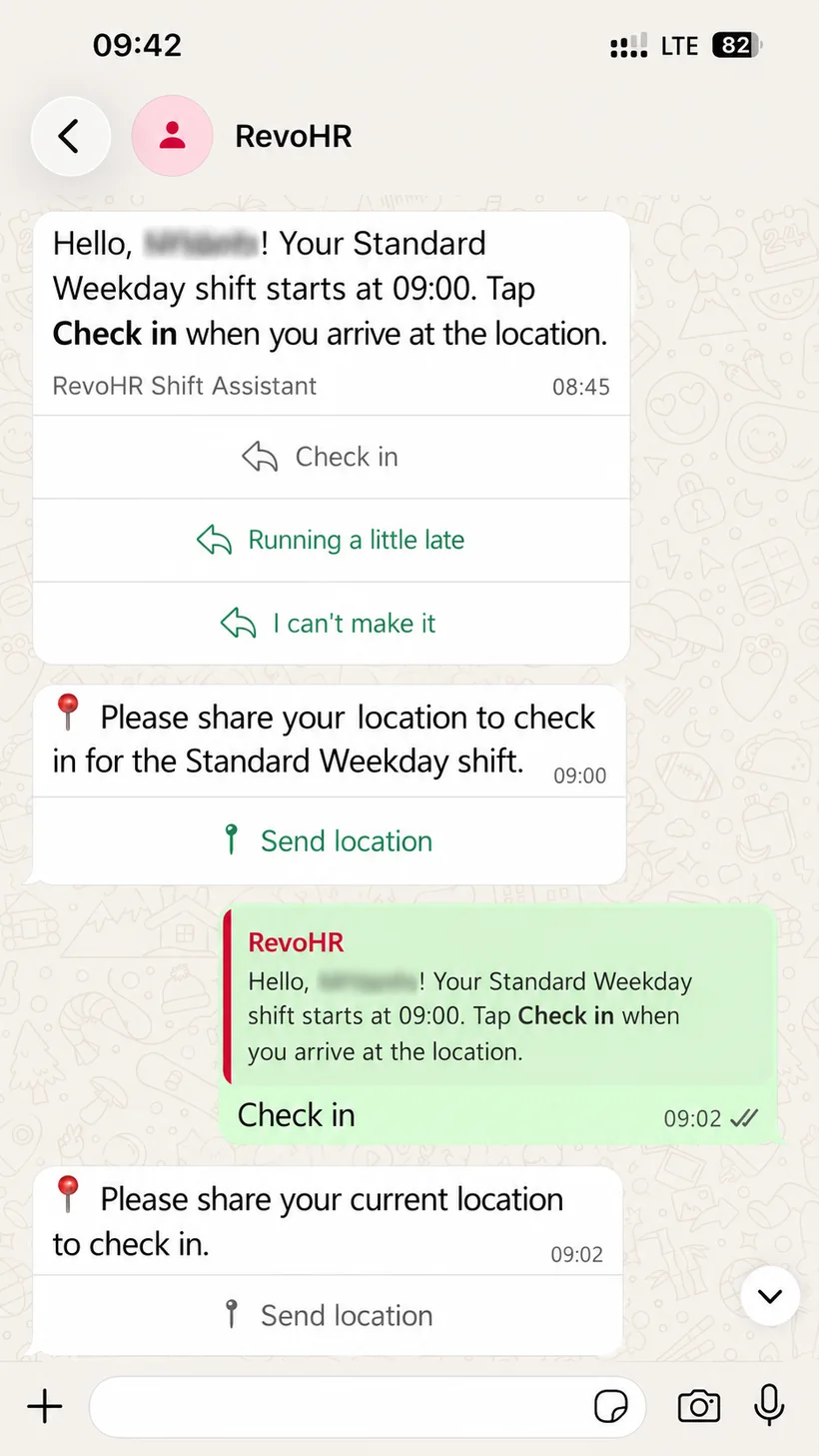
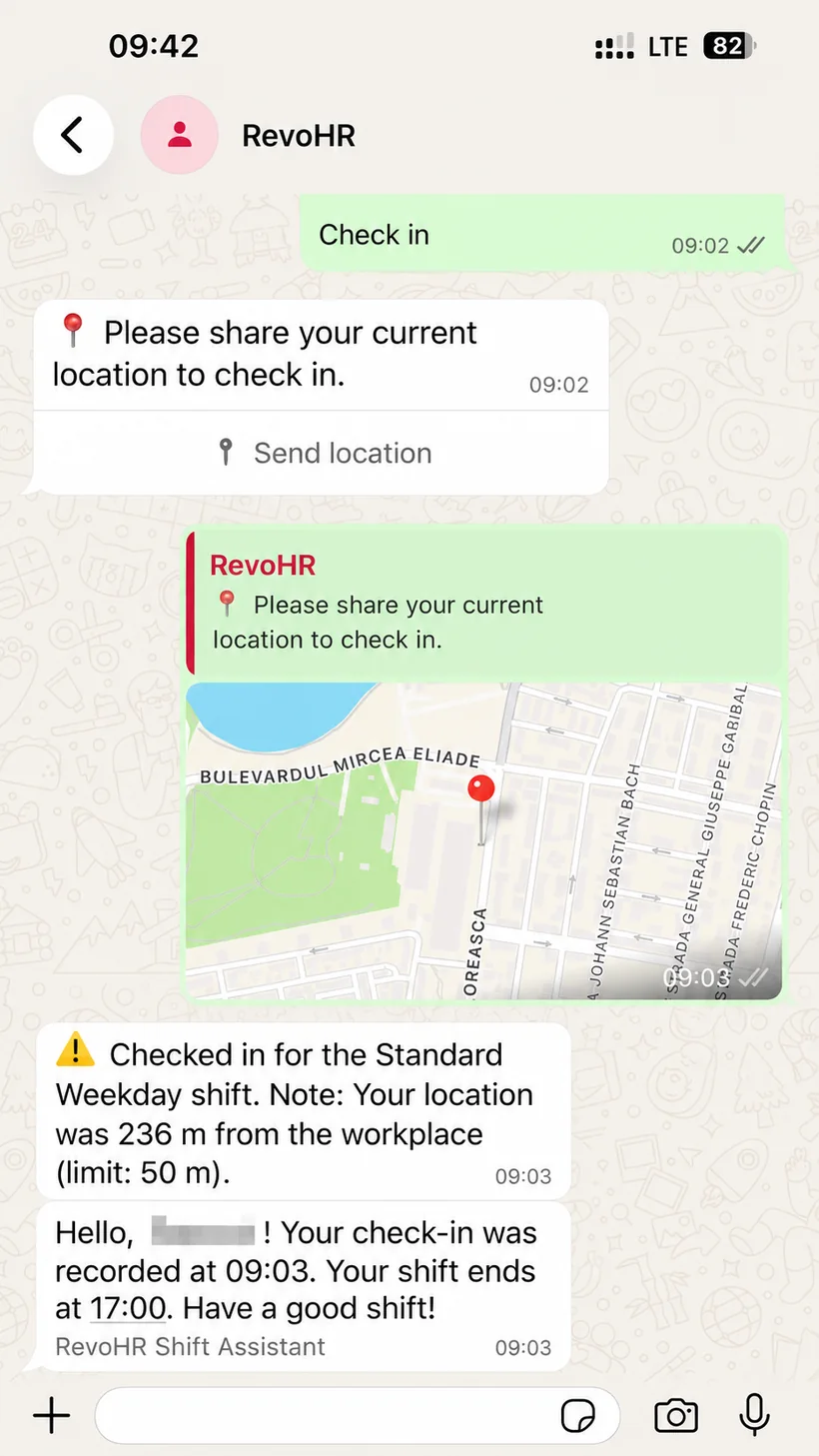
The worker never opens a portal. The shift reminder, the check-in action, the location request and the result all happen in one conversation.
Workers can respond directly to the shift reminder. If they are running late or cannot make it, they can notify the team from the same WhatsApp flow, without separate calls or messages.
When the shared location falls outside the site geofence, the worker is told the distance and the record is kept as an exception for HR to review.
- 1Shift reminder
- 2Check-in from the chat
- 3Location shared
- 4Confirmation or exception
Illustration of the WhatsApp flow — rendered, not a device capture
A live operational record, not a spreadsheet assembled at month end
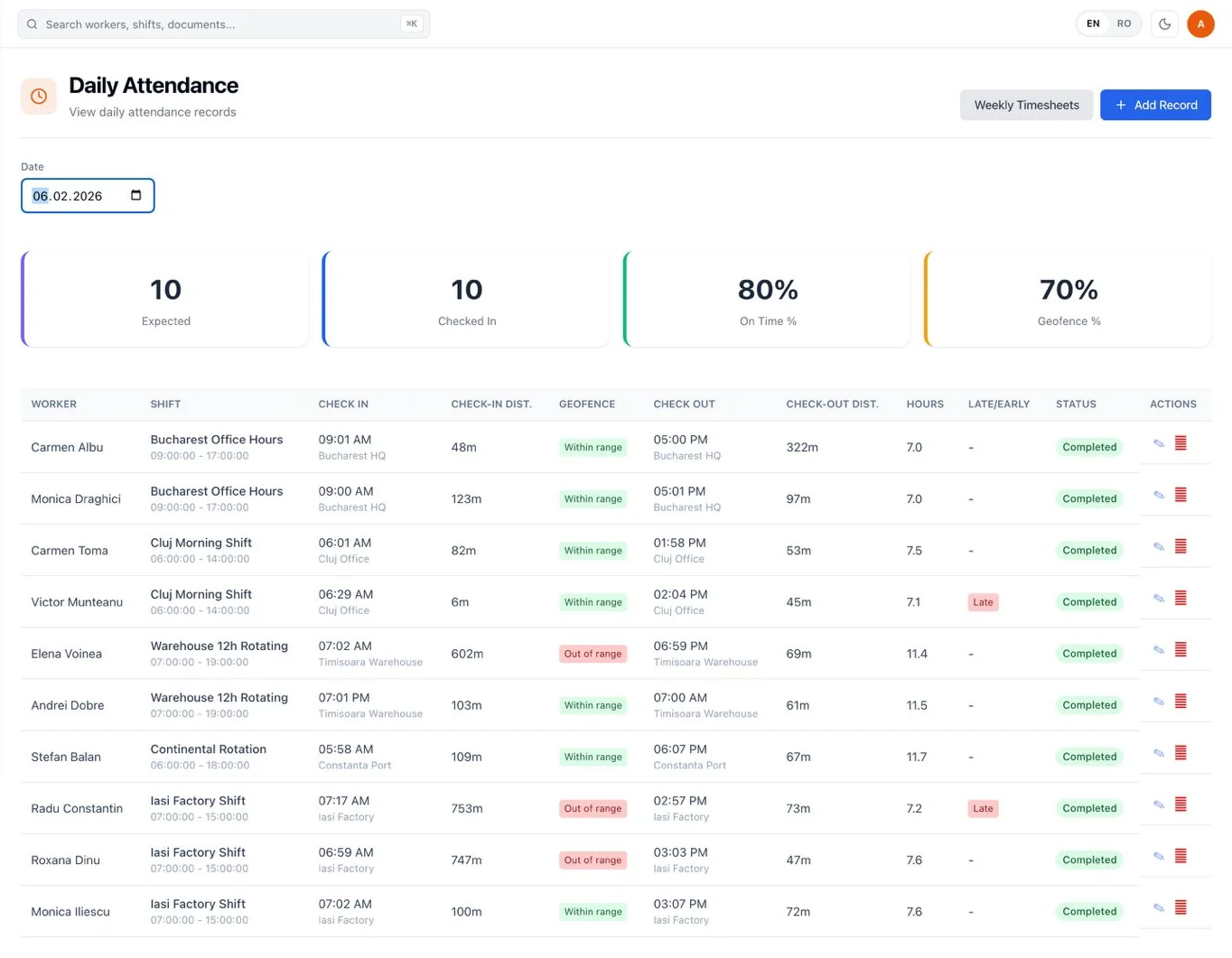
The attendance view brings the expected shift and the actual attendance record together.
What the team can review
- expected workers for the selected day
- check-in and check-out times
- check-in and check-out distance
- geofence status
- hours recorded
- late or early status
- missed attendance
- records that need human correction
From check-in to approved timesheet
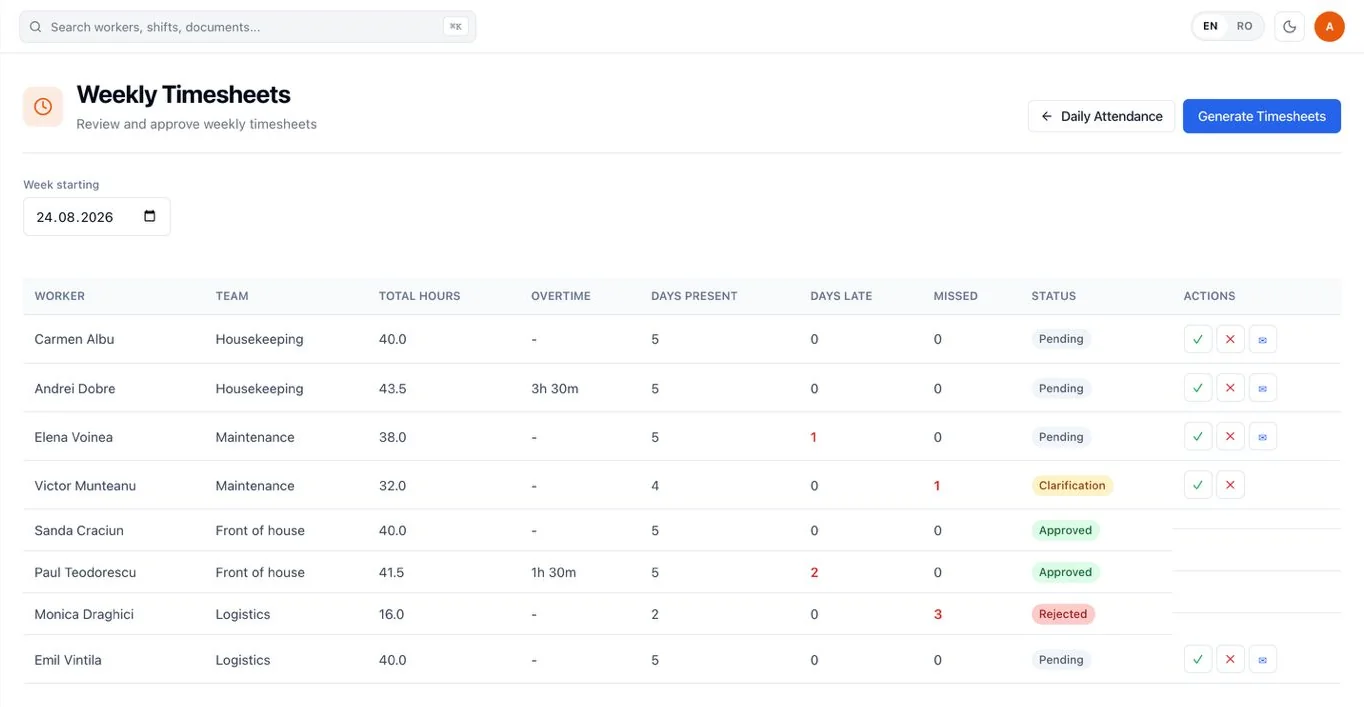
Workers check in and out through WhatsApp by sharing their location. RevoHR records the time, position and distance from the worksite and connects the record to the scheduled shift. Attendance records are used to generate weekly timesheets, which HR can review, approve, reject or send for clarification before export.
Review exceptions before approving hours
For each weekly timesheet, HR can review recorded hours, attendance, lateness and missed shifts. A timesheet can be approved, rejected with a reason, or sent back for clarification without rejecting it. The timesheet remains traceable to the underlying attendance records and their geofence and exception flags, so HR can verify the evidence behind the total.
What changes operationally
Nothing to install at the door
No terminals, no badge readers and no app to deploy or maintain per location. The worker uses the phone they already carry.
A GPS reading never blocks anyone
An out-of-range check-in is not rejected. The worker is checked in and the record is flagged, so HR reviews the flagged records instead of chasing people who could not clock in.
Gaps close themselves
A worker who never checks in is marked as missed roughly two hours after the shift starts, and told. A check-in with no check-out is closed automatically about three hours after the scheduled end.
Every total can be traced back
A weekly total is not a number to take on trust. It traces back to the attendance records behind it, with their distances, geofence status and exception flags.
Built for workplaces with more than one door
Attendance gets harder when the workforce is distributed across factories, construction sites, warehouses, hotels or client locations.
RevoHR supports site-level geofencing, so the attendance rule follows the location the worker is expected to attend.
Operational examples
Construction
Check attendance across changing sites without installing a clocking terminal at every project location.
Manufacturing
Compare scheduled workers with actual attendance for shift-based teams and identify missed or late records.
Logistics & warehousing
Use the same attendance process across multiple warehouses or depots while keeping location-specific verification.
Staffing & outsourcing
Maintain structured attendance records across client sites without asking every client location to run the same hardware setup.
What this replaces
| Current process | RevoHR approach |
|---|---|
| Paper sign-in sheet | WhatsApp check-in with timestamp |
| Card or terminal at each site | Worker uses their phone |
| Attendance collected later | Live attendance record |
| Manual Excel consolidation | Structured weekly timesheet |
| Location disputes with no context | Point-in-time GPS + site geofence |
Attendance is only one part of the worker interaction
The employee does not need one tool for attendance and another one for every other HR request. In the same WhatsApp experience, RevoHR can also handle leave requests, schedule questions, training delivery and policy Q&A.
This matters most for workers for whom corporate email, a laptop and an HR portal are simply not part of the job.
Related product pages
Further reading
Frequently asked questions
- How do workers clock in without a terminal or badge?
- Workers check in and out directly through WhatsApp by sharing their location. RevoHR records the time, position and distance from the worksite.
- How does RevoHR verify that a worker is at the right location?
- Each location is configured with coordinates and a geofence radius. At check-in or check-out, RevoHR compares the shared location with that perimeter and can flag exceptions for review.
- What happens to daily attendance records afterwards?
- Attendance records are used to generate weekly timesheets that HR can review and approve.
- Can HR review exceptions before approving hours?
- Yes. Weekly timesheets can be approved, rejected with a reason, or sent for clarification. The system keeps the underlying attendance, geofence and exception evidence available for review.
- What happens if a worker has no published shift?
- Attendance records are created from the published schedule. If there is no published shift for that day, there is no corresponding attendance row.
- Do workers need to install another app?
- No. Attendance runs through WhatsApp, without a separate worker app, badge or clock-in terminal.