
Analytics & Reporting
See what happened without rebuilding it at the end of the month
RevoHR turns attendance, leave, training and compliance activity into reports HR can review while the records are still connected to the worker, the site and the event that created them.
- Attendance, leave and training reporting
- Worker- and site-level detail
- Every figure traces back to its record
- CSV export of the filtered view
The report should still lead back to the underlying record
A total nobody can open is a number you have to trust.
A weekly timesheet in RevoHR is generated from attendance records, and each of those records carries its own check-in time, its distance from the site and any exception flag raised at the time. When an approver questions a figure, the evidence behind it is one click away rather than a reconstruction.
The same is true elsewhere. A leave request carries its reference number, its balance at the time, its approver and its reason. A training assignment carries its delivery state, its progress and its quiz result. Reporting reads those records instead of replacing them.
Attendance reporting is more than a monthly total
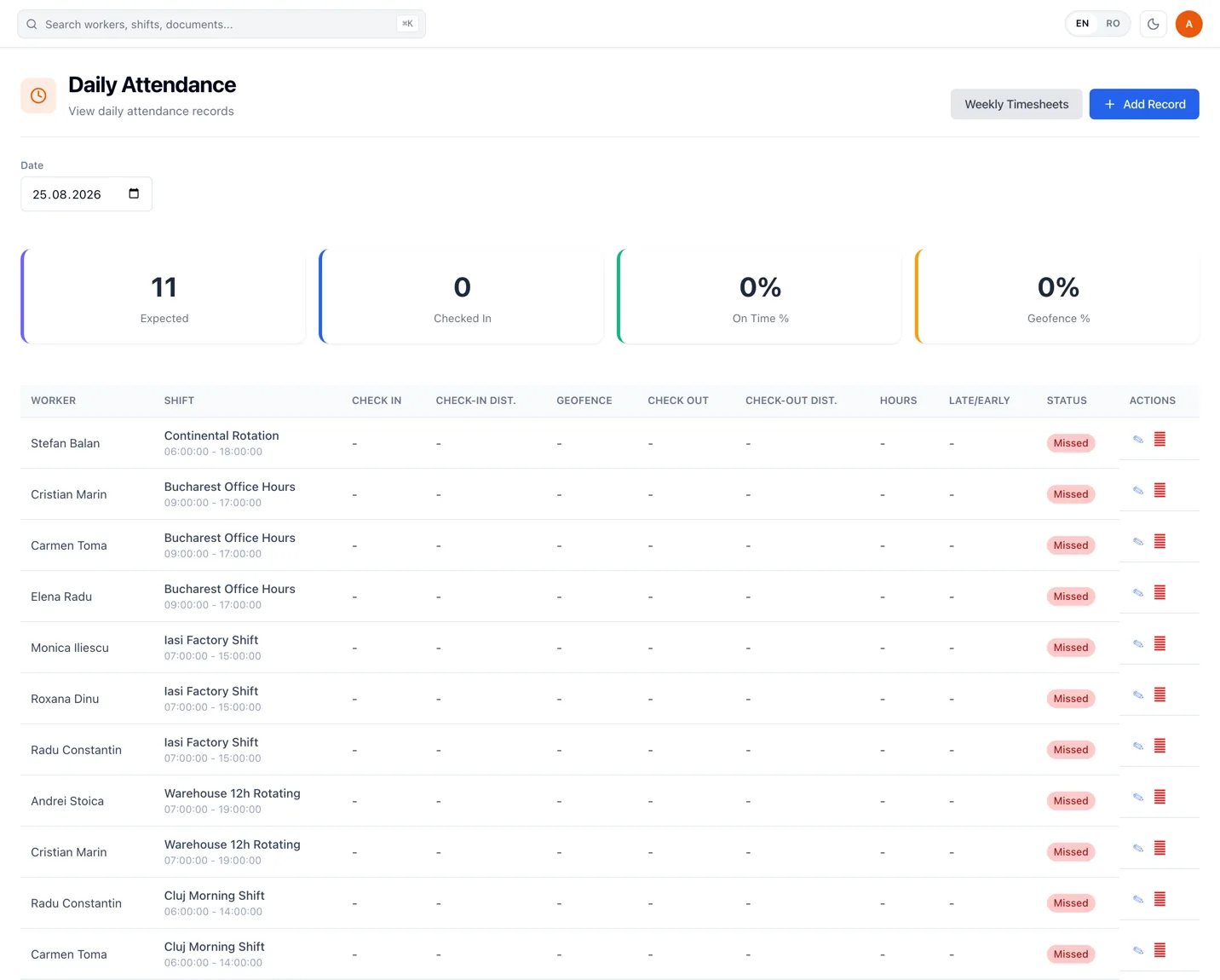
Attendance is reviewed by day, per worker, against the shift they were scheduled on. The screen carries the summary for the date and then the detail behind it, which is where the questions actually get answered: who was late, who was outside the geofence, who never checked in.
Some of it happens without anybody watching. A worker who never checks in is marked missed automatically about two hours after the shift starts, and a shift left open is closed automatically about three hours after it should have ended. By the time HR looks, the exceptions are already the short list.
What a row carries
- The shift the worker was scheduled on, with its times
- Check-in and check-out times
- Distance from the site at each, and whether it was inside the geofence
- Hours worked, and lateness or early departure
- A status: scheduled, in progress, completed, missed or exception
Training reporting shows who completed what and how they performed
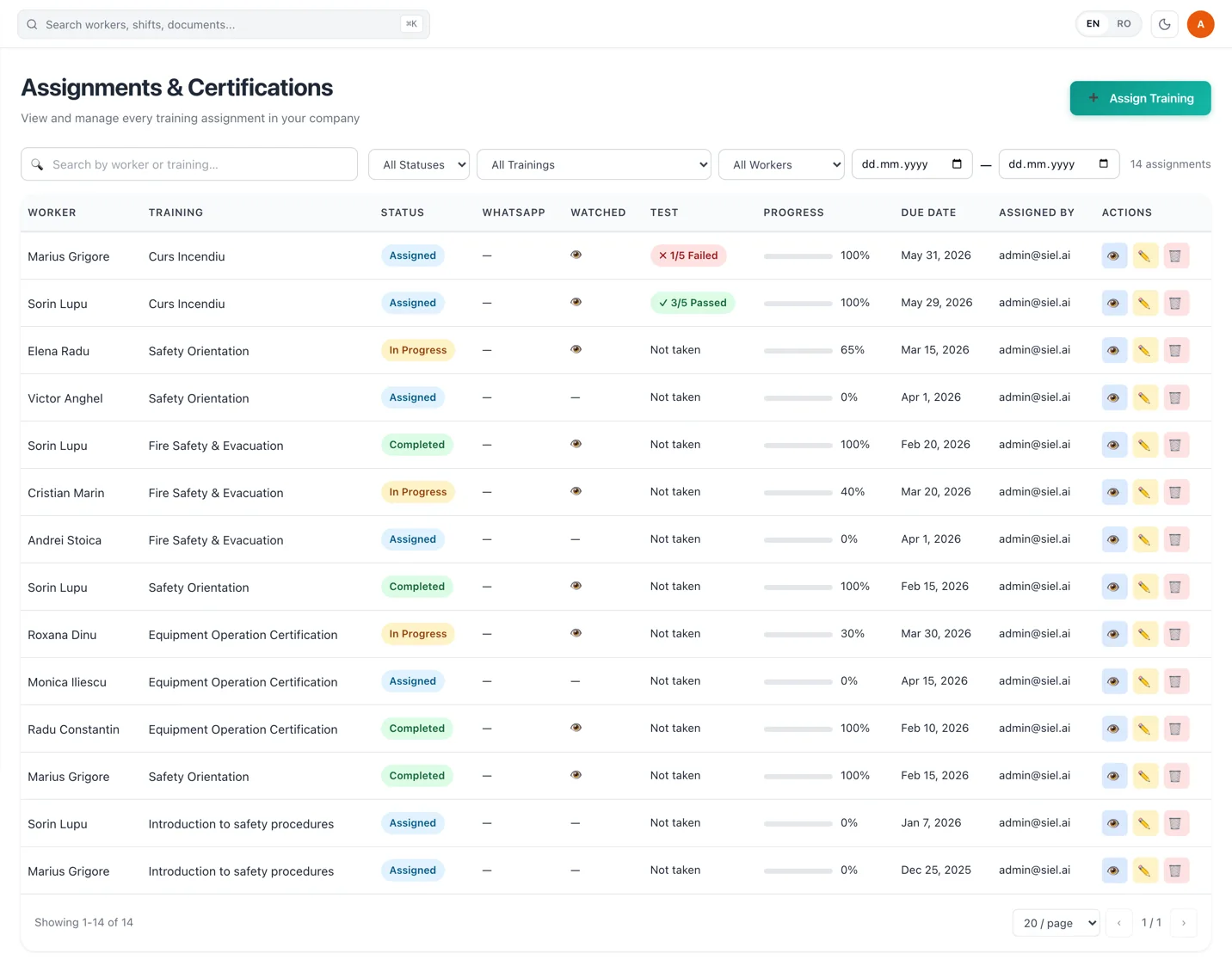
Training in RevoHR is delivered over WhatsApp and assessed, which means the report is not a distribution log. For each assignment you can see whether the message was delivered, how far the worker got, whether the quiz was passed, and against which due date.
Because the training carries the language it was authored in, and the worker carries their preferred language, completion is evidence that someone was trained in a language they read — not that a file was sent to them.
Leave reporting keeps usage and balances visible
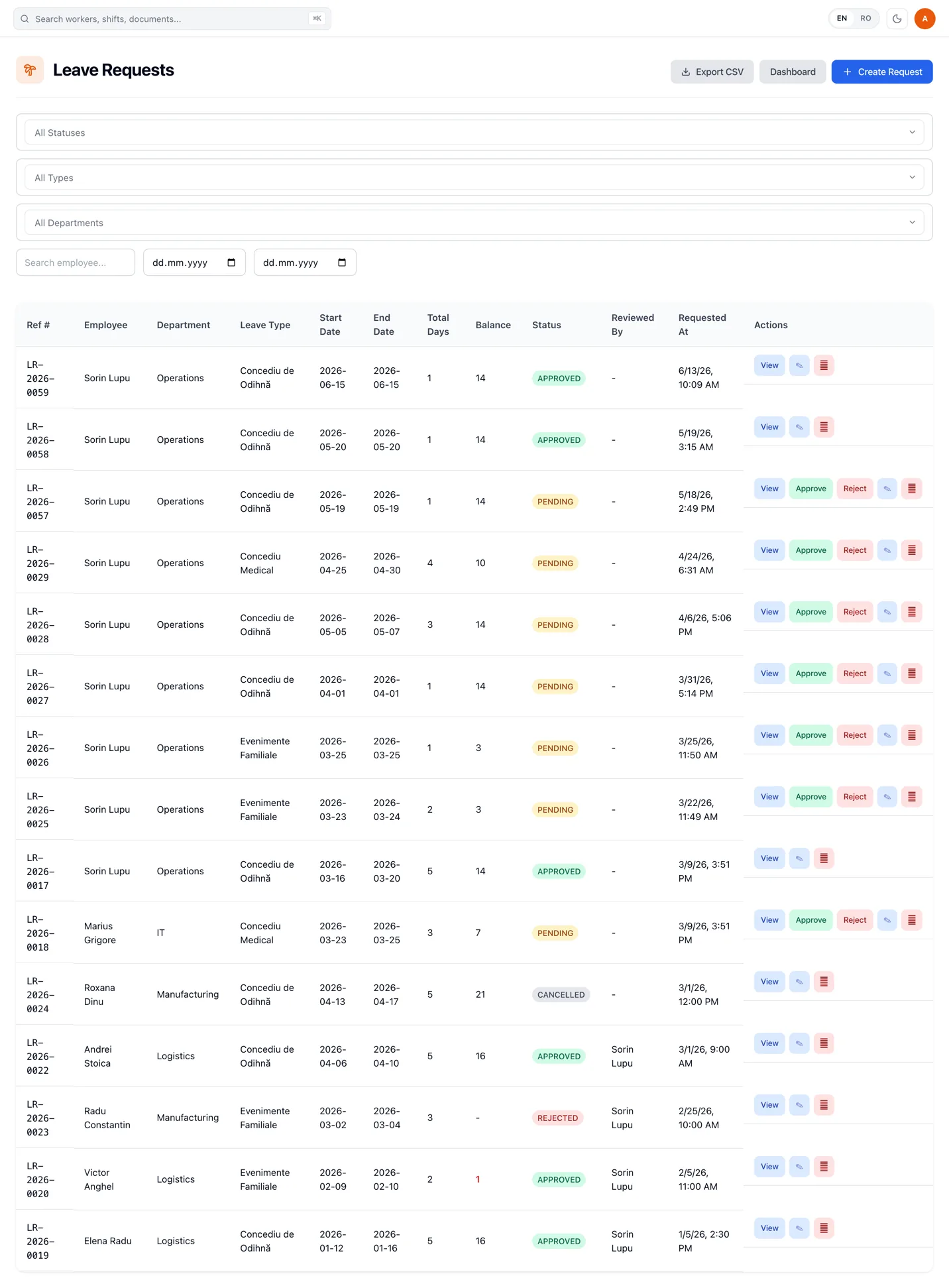
Leave requests are filtered by status, type, department, worker and date range, and the filtered view is what exports. Each request keeps its reference number, its dates, its day count, the balance it was checked against, its status and who reviewed it.
A date-range dashboard sits behind the same list for when the question is about a period rather than a request.
Balances stay in the same place as the requests
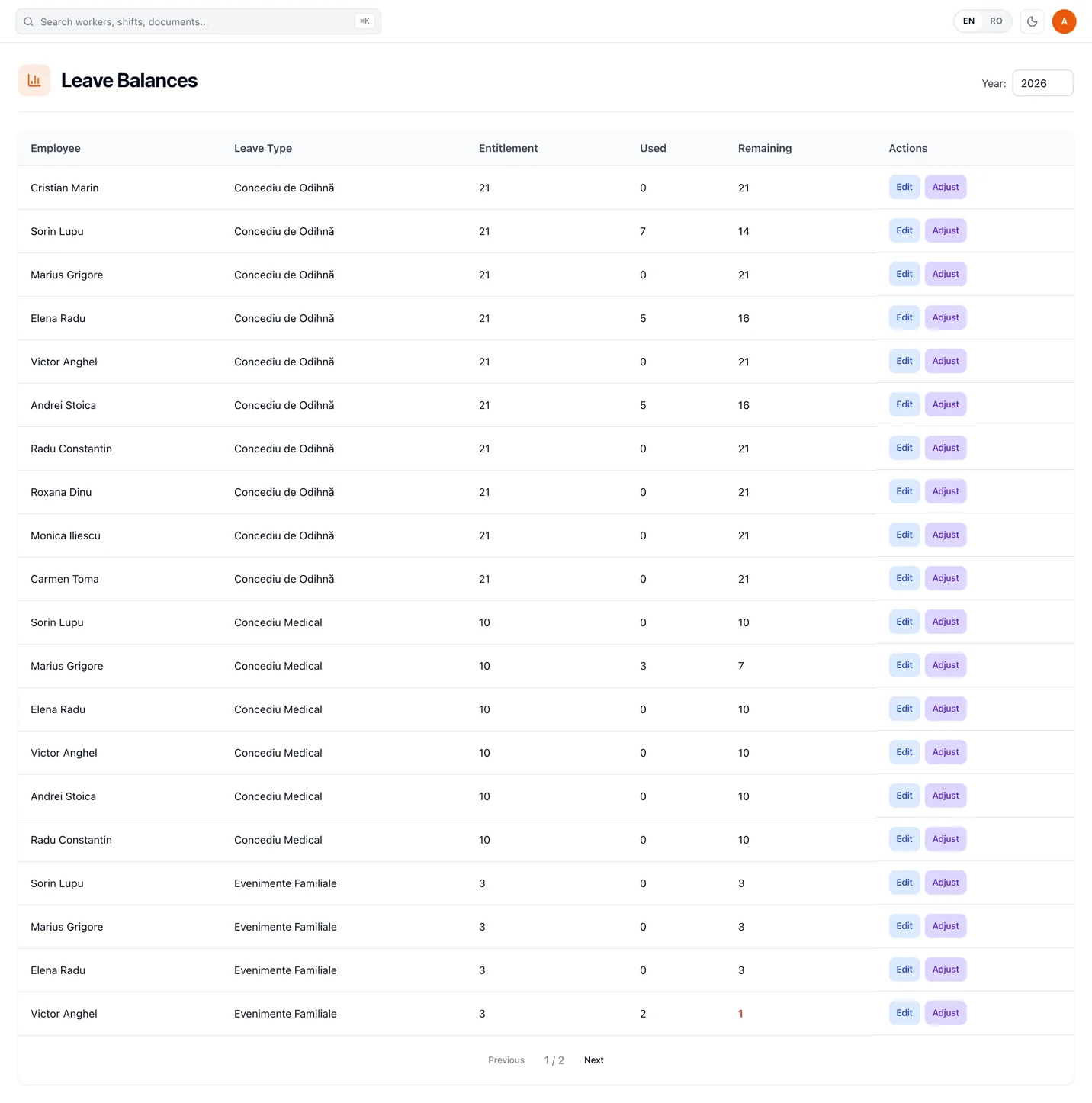
Entitlement, taken and remaining days are tracked per worker, per year and per leave type, in the same system the requests were approved in. An adjustment for carry-over or a correction is made against the worker and recorded, rather than applied silently in a spreadsheet nobody versions.
Training, certification and attendance evidence in one view
The evidence that a worker was trained, is certified and was present sits in three different modules — and it is the combination that gets asked for, usually at short notice.
RevoHR shows training completion, certification status and attendance evidence together, per worker or per client, so answering the question is a matter of opening a view rather than running a collection exercise.
Live activity shows what is happening now
Some questions are not about last month. A live view shows check-ins, training completions, leave approvals and assistant conversations as they happen, so an exception surfaces while the shift is still running.
Attendance has its own live picture: expected against actual headcount, punctuality, and check-ins recorded outside the geofence. By the time HR looks, the list worth acting on is already short.
For video training there is a view of the workers who need a human — the ones who failed, timed out or stalled — ordered by urgency, which is a more useful thing to look at on a Tuesday morning than a completion percentage.
Export when someone outside RevoHR needs the data
Records export in PDF, CSV and Excel, and the format can follow what a particular client or auditor asks for. What leaves the platform is the view you were already looking at, which is the only way an export stays reconcilable with the records behind it.
Where a file is not the right answer, the same records are available through an API, so the system that needs them can read them directly instead of waiting for someone to send a spreadsheet.
The report that gets asked for depends on who is asking
Operational examples
Manufacturing
Scheduled against actual attendance, per shift and per line, for the days in question.
Construction
Hours per site, with the check-in distance sitting behind each figure.
Hospitality
Who worked which shift in a week where the schedule changed twice.
Staffing & outsourcing
One client's workers, with their attendance and their training status, and none of the other clients in the same view.
What this replaces
| Current process | RevoHR approach |
|---|---|
| Monthly attendance merged from several spreadsheets | Attendance reporting from the structured records |
| Training completion checked by hand | Per-worker completion and quiz results |
| Leave balances maintained in a separate file | Balances from the same records as the requests |
| Compliance evidence collected on request | Training, certification and attendance evidence in one view |
| Data copied into another file before sharing | CSV export of the filtered view |
The reporting is only as good as the records underneath it
Which is the argument for capturing attendance, leave and training in one system in the first place. Every report on this page is a view of records the operational work already produced.
Related product pages
Frequently asked questions
- What can RevoHR report on?
- Attendance and weekly timesheets, leave requests and balances, training assignments with their completion and quiz results, and the document and certification records behind compliance questions.
- Can reports be viewed by worker or location?
- Yes. Attendance is reviewed per day and per worker against the shift they were scheduled on, and the employee list filters by location, department, job title and status. Leave requests filter by status, type, department, worker and date range.
- Does RevoHR report training completion and quiz results?
- Yes. Each training assignment shows whether the WhatsApp notification was delivered, how far the worker got, the quiz result and the due date.
- Can HR see document and certification expiry in reporting?
- Yes. Certification status sits alongside training completion and attendance evidence, so certifications that have expired or are close to it can be identified together with the rest of that worker's record.
- Can reports be exported?
- Yes. Records export in PDF, CSV and Excel, and the format can follow what a client or an auditor asks for. An export takes the view as filtered, so it stays reconcilable with the records behind it. The organisation chart exports to PDF, PNG or CSV.
- Can another system read these records directly?
- Yes. Where a direct integration is preferred to a file, the same records are available through an API, so the system that needs them does not have to wait for an export to be sent.